 Kill a few minutes before lunch at Typewar by identifying the typeface for any given letter. If you know your fonts, you might get bored quickly since the two choices often look nothing alike and only a few typefaces are represented. Then again, an L in Helvetica Neue and Verdana look mighty similar... As you continue to advance through the levels, more fonts are unlocked.
Jumat, 15 Oktober 2010
Typewar: a font game
Kill a few minutes before lunch at Typewar by identifying the typeface for any given letter. If you know your fonts, you might get bored quickly since the two choices often look nothing alike and only a few typefaces are represented. Then again, an L in Helvetica Neue and Verdana look mighty similar... As you continue to advance through the levels, more fonts are unlocked.

Kamis, 14 Oktober 2010
Patterned desktops and printables from Mae
 Mae, an Australian fabric decal company, offers printable wrapping papers and pretty pastel desktop wallpapers with calendars, free for the downloading. Help yourself right here.
Rabu, 13 Oktober 2010
DIY decorating with books
 If you need a cheap decorating idea that will make you look smarter, check out these tutorials using books as wall art. You probably have a million books sitting around already. If not, hit up your nearest garage sale, rescue some from a dumpster, or take some from the stacks on the floor at my house.
Bookshelf made of books by McJulie-O (scroll down for how-to)
Upside down trick bookshelf by Fungus Amungus
Invisible bookshelf by May December Home that doesn't sacrifice any books, or one that does at Lifehacker
Book wall art at Paper n Stitch
Selasa, 12 Oktober 2010
Reverse image search with TinEye
 TinEye is a reverse image search engine. Submit a picture, and TinEye will tell you where it's being used on the web. This could be very handy when you've saved an inspiring photo and can't remember where you found it. I tested it by searching for this photo of mine and found it on 24 sites. Interesting!
Senin, 11 Oktober 2010
Now stocking Sourpuss brand goodies
The time has come for us to expand our horizons! From now on, sassyNpunk is not only going to be selling our own line of products, but we are now offering some of our favorite brand's goodies too! sassyNpunk has teamed up with Sourpuss Clothing to bring you the best in unusual and creepy finds. We thought we should add a dash of evil to our shelves, and Sourpuss has just the right amount of debauchery to balance out our pristine image ;)
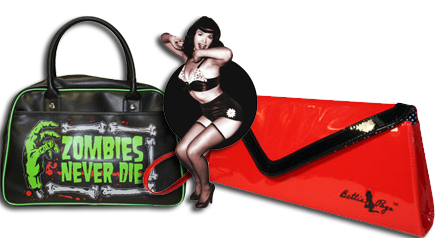 They're bringing in Zombies, Pin Ups, Guns, knives & a whole lot of style! So be sure to visit our official website to check out all the new horror, along with your favorite sassyNpunk treats! Our ArtFire studio is still your primary source for sassyNpunk products, but we can only list items made by us on ArtFire! So if you want to get your hands on some other great brands along with ours, then you have to head over to www.sassyNpunkBoutique.com & navigate to our products page!
Making fabric iron-ons
 My latest test with the Silhouette machine involved fabric. I ironed Heat'n Bond to the back of some thin cotton, held my breath, and ran it through the cutter. There were a couple places, mostly in corners, where the blade didn't quite cut all the way through, but it was easy to touch them up with a scissors. Then I ironed the shape onto a onesie. The machine will only cut through very light-weight fabrics, I think, and you'll likely need to apply some kind of backing or stiffener to them.
 I ironed more fabric onto cardstock to make a matching notecard. The card had to be cut with a scissors since the Silhouette felt unhappy about slicing through fabric and cardstock together. That's okay. I don't want to be too demanding.
11/9/2010 Update: Just got this from the folks at Silhouette support: "Attempts to cut thicker materials or certain materials the Silhouette is not designed to cut that are more dense (such as shrink plastic, foam, chipboard) or fibrous in nature (such as fabric) may ruin the blade or result in the blade dulling very quickly." Um, okay. Sorry little blade. I won't cut fabric anymore.
1/31/2011 Update: Silhouette support now states it is possible to cut fabric using their new interfacing options. See here for more information.
Jumat, 08 Oktober 2010
How to make recycled paper flowers
 I learned to make paper flowers a long time ago with directions from a library book. They don't require any adhesive, and there are just four shapes to cut out.
  Use them to decorate gifts or make wreaths. I chopped up a fancy Urban Outfitters catalog for these.
You can make template pieces to trace around and then cut out the shapes with a scissors—what I used to do. But this seemed like a good test for the Silhouette cutter, so I recreated the pattern pieces in Illustrator on my Mac and commanded the machine to cut them for me. It took about fifteen seconds to cut the parts for one flower. Whoa. I shall never return to my primitive, scissors-wielding caveman ways.
 If you'd like to download the PDF templates, get the large flower here and the small flower here.
 [Cutting from Adobe Illustrator with the Silhouette currently requires a free plug-in called Cutting Master 2 that works with Illustrator 10 - CS5, available for Mac or PC.]
 To make the flowers, do the following:
1. Score the back of each petal along the lines shown in pencil, above.
2. Pleat the petals along the scored lines, always folding in the same direction.
 3. Fold the triangle portion of the stem in half lengthwise. Do this two more times until it reminds you of a toothpick.
4. Using a chopstick or skewer, roll the "flag" portion of the stem toward the "toothpick." This curl will form the center of the flower.
 5. Curl the ends of each petal backward to give them shape.
6. With a skewer or sharp pencil, poke a hole in the center of each flower piece.
7.Thread the pieces onto the stem, from smallest to largest. Finished!

Langganan:
Postingan (Atom)